[windows] memory management internals
I always wanted to condense in a one-pager all the wonderuful concepts about memory internals from the “Rootkit Arsnel” by B.Blunden - so here they are! The memory models, which are still relevant, are described around the x86 specs, whereas the playalongs are x64 based, so anyone can get similar results by running the latest win10 version.
x86 - Abstractions
Memory Models
Flat Model
Contiguous address space, can be mapped 1:1 to phy address space or seen as linear address space during virtual memory.
Real Mode
Old native 16-bit 8086/88 mode of operation. New processors might boot in real mode for backwards compatibilty to support MSDOS booting from disk. Uses 20-bit address space through a segment selector and effective address (offset) The 16-bit segment selector is treated as virtual 20-bit value as a [0] is virtually appended at its end.
Segment Selector  0x2000 -> 0x2000[0] -> 0x20000
+Effective Addr.  0x2002 -> 0x0002    -> 0x00002
________________________________________________
Physical Addr.                           0x20002
Real mode effective address (offset) is limited to 16-bit, thus can only access a 64KB of memory. The segment registers (CS,DS,SS,ES,FS,GS) store segment selectors, the first half ot the logical address. So a program can have max x6 segments at a time. The pointer registers (IP,SP,BP) store the second half of the logical address (effective address.)
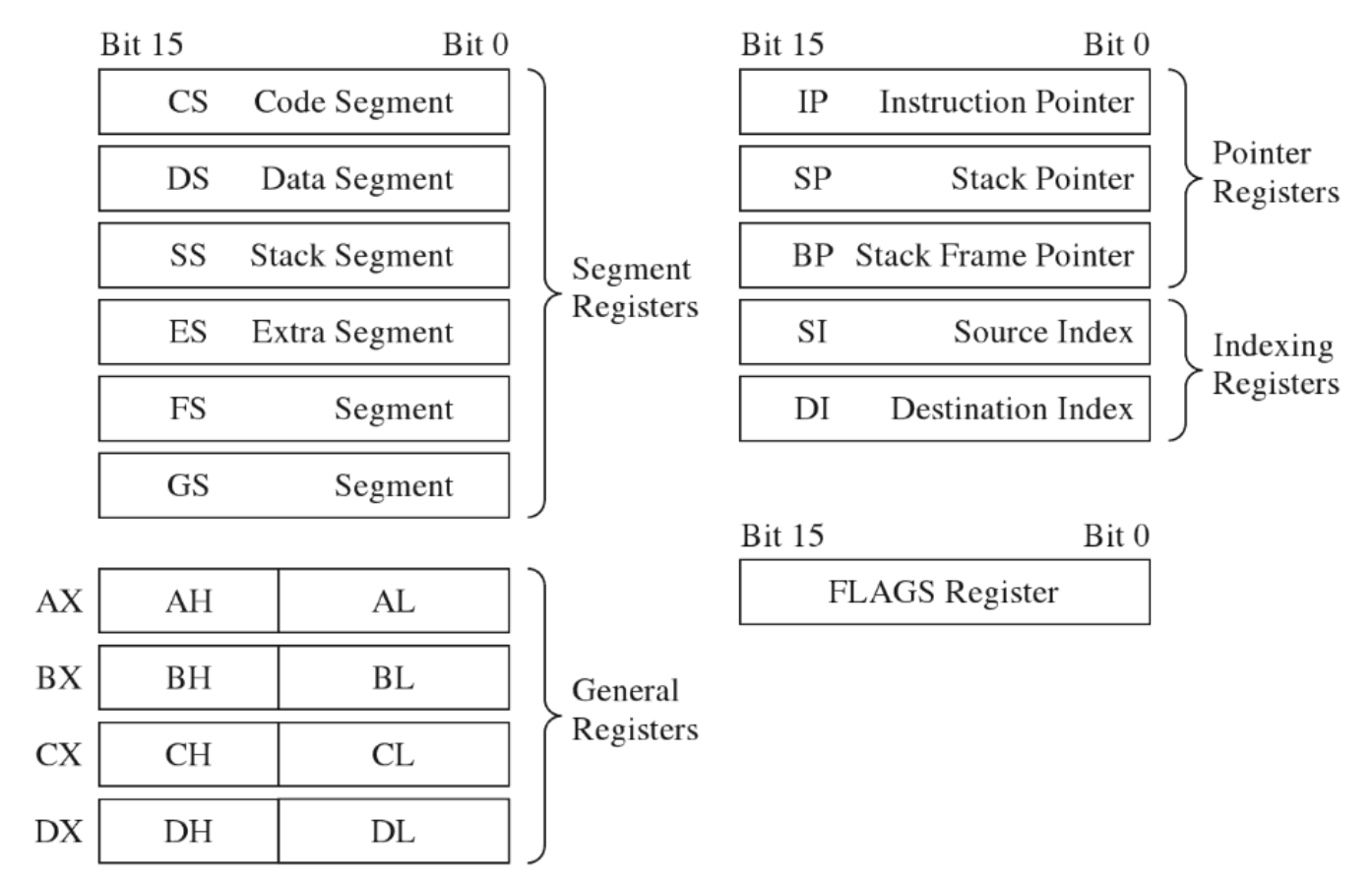
No protection is in place under this mode, so the user can modify the OS at any time
MS-DOS
It’s a real mode OS, and a nice case study, plus has a nice 16-bit debugger named ‘debug’ :)
debug.exe [program name]
-r
AX=0000  BX=0000  CX=003B  DX=0000  SP=FFFE  BP=0000  SI=0000  DI=0000
DS=117C  ES=117C  SS=117C  CS=117C  IP=0100   NV UP EI PL NZ NA PO NC
117C:0100 B409          MOV	AH,09
-p
AX=0900  BX=0000  CX=003B  DX=0000  SP=FFFE  BP=0000  SI=0000  DI=0000
DS=117C  ES=117C  SS=117C  CS=117C  IP=0102   NV UP EI PL NZ NA PO NC
117C:0102 BA0C01        MOV	DX,010C
Real Mode Interrupts
Executes an interrupt service routine (ISR/interrupt handler) The first KB of memory is used to store the Interrupt Vector Table (IVT) from 0x00000 to 0x003FF. This table stores interrupt descriptors (or interrupt vectors)
| CS High Byte |      |
| CS Low  Byte |  [INT 0x01]
| IP High Byte |      |
| IP Low  Byte |  Address 0x00004
| CS High Byte |      |
| CS Low  Byte |  [INT 0x00]
| IP High Byte |      |
| IP Low  Byte |  Address 0x00000
Three different types of interrupts:
-
Hardware Interrupts (maskable and nonmaskable)
Generated by externarl devices and async by nature
-
Software interrupts Implemented as INT instructions in a program.
-
Exceptions (faults, traps,aborts)
Generated when a processor detects an error while executing an instruction.
-
Fault: processor report an exception and program is reset
-
Trap: no instruction restart is possible (example are BP and Overflow)
-
Abort: program is terminated.
-
JUMPS and CALLS
JUMPS
| JMP Type | Example | Machine Encoding |
|---|---|---|
| Short | JMP SHORT mylabel | 0xEB [signed byte] |
| Near direct | JMP NEAR PTR mylabel | 0xE9 [low byte] [high byte] |
| Near indirect | JMP BX | 0xFF 0xE3 |
| Far direct | JMP DS:[mylabel] | 0xEA [IP low] [IP high] [CS low] [CS high] |
| Far indirect | JMP DWORD PTR[BX] | 0xFF 0x2F |
CALLS
| JMP Type | Example | Machine Encoding |
|---|---|---|
| Near direct | CALL mylabel | 0xE8 [low byte] [high byte] |
| Near indirect | CALL BX | 0xFF 0xD3 |
| Far direct | CALL DS:[mylabel] | 0x9A [IP low] [IP high] [CS low] [CS high] |
| Far indirect | CALL DWORD PTR [BX] | 0xFF 0x1F |
| Near return | RET | 0xC3 |
| Far return | RETF | 0XCB |
Protected Mode
IA-32 has two submodes that helps protected mode:
- Segmentation
- Paging
Segmentation
Segmentation is mandatory while Paging is optional. Segment selector points to a table entry that describes a segment in linear address space. This table is the Descriptor Table and Segment Descriptors its entries.
The Global Descriptor Table Register (GDTR) holds the base address of the GDT, it’s 48 bits and defines the size and the base address of the GDT.
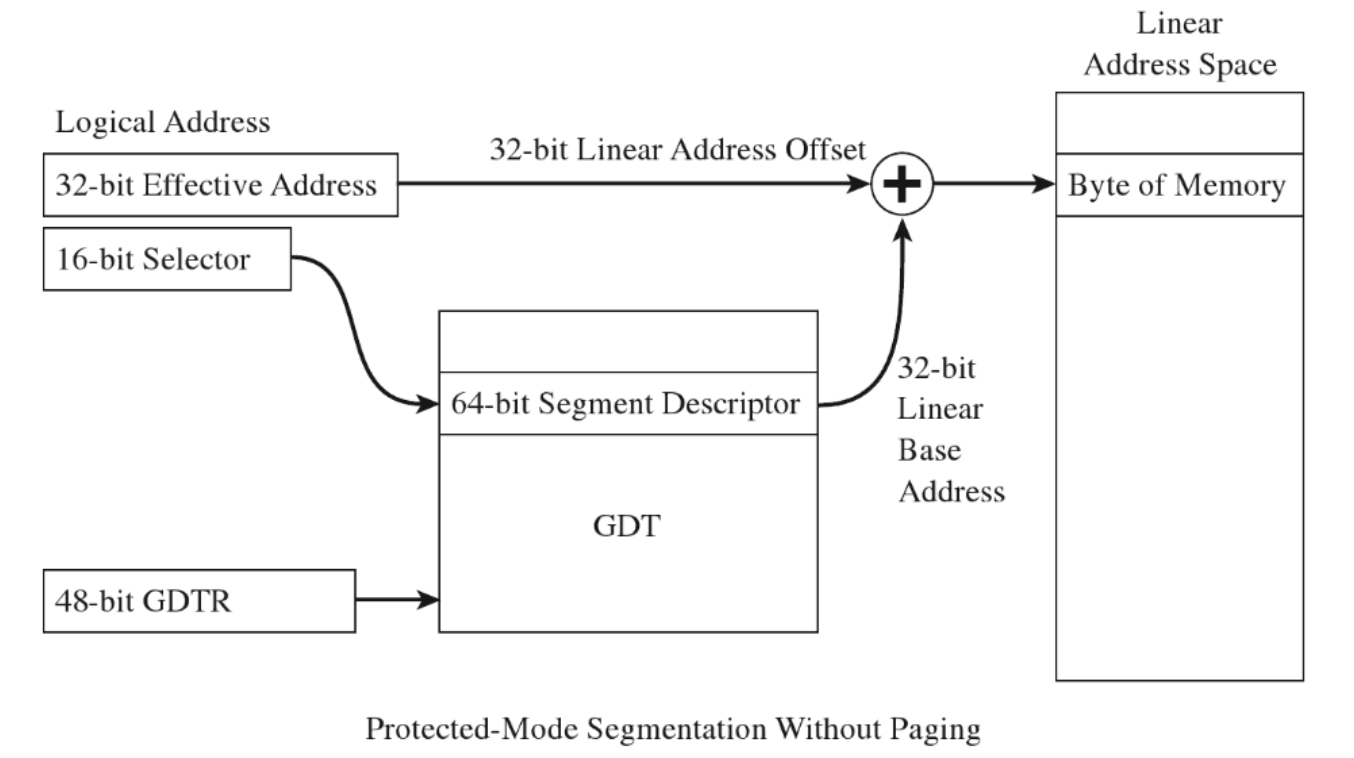
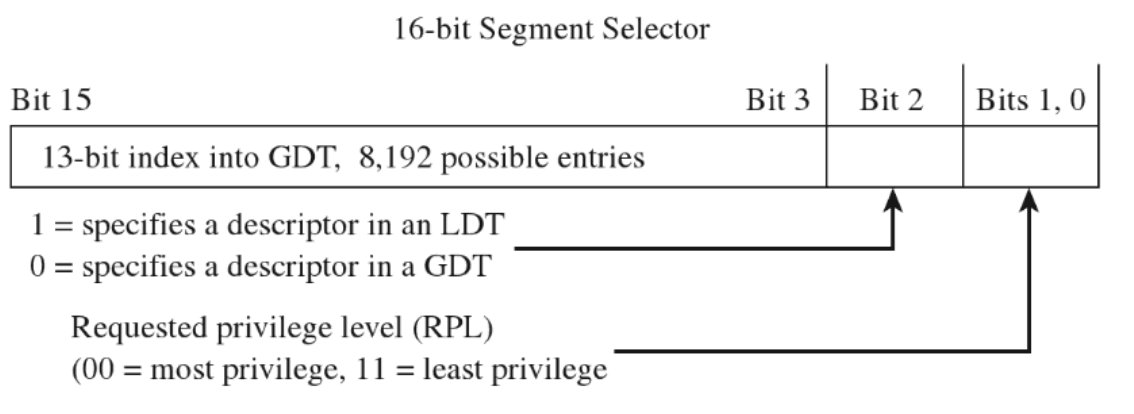
Segment Selector: It’s a 16-bit value that points into three fields: indext into GDT, specify if is GDT/LDT and RPL
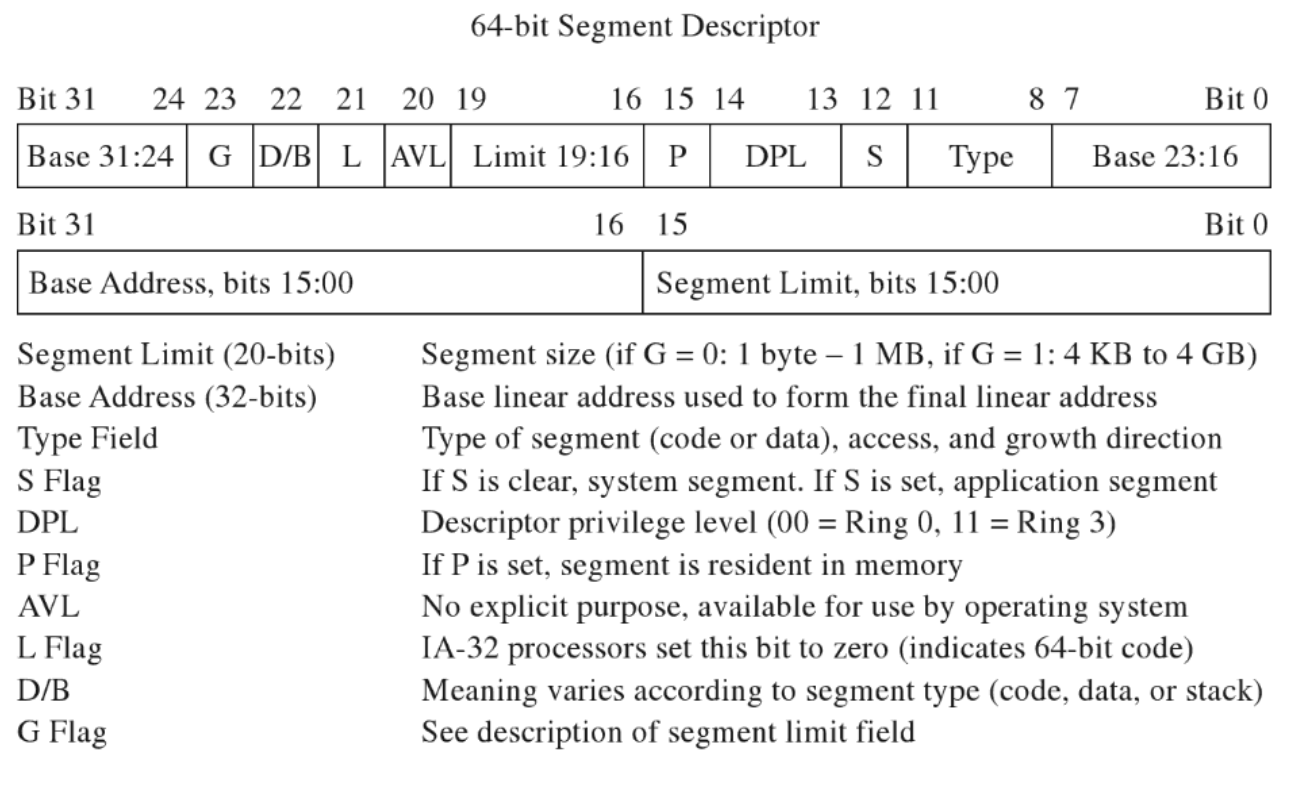
Segmenet Descriptor:
It’s a 64-bit value that includes Code and Data Segments via Type Field
Segmentation Facilities
| Segment Contruct | Memory Protection Components |
|---|---|
| Segment Selector | RPL Field |
| CS and SS registers | CPL field |
| GDT | Segment and gate descriptors |
| IDT | Gate Descriptors |
| GDTR | GDT size limit and base address (GDTR instruction) |
| IDTR | IDT size limit and base address (LIDT instruction) |
| GP exception | Generated by the CPU when segment check is violated |
| CR0 register | PE flag, enables segmentation |
Paging
When paging is enabled it devides the linear address space into fixed sized storage named pages (4KB,2MB or 4MB). Pages can be mapped to physical memory or stored to disk (demand paging/page fault).
WIthout paging a linear address equals a physical address. however, when paging is enabled, the linear address is splitted into these logical fields.
The first byte (base address) of Page Directory is stored in control register CR3 or PDBR. Each PDE points to the base physical address of a Page Directory and a PTE stores the first byte of a page in memory.
Paging works by taking the linear/logical address from segmentation and split it over a hierarchy of physical addreses. Given the above model (1024 * 1024 * 4096 KB) we are limited to 4GB of physical memory.
Restricted Instructions
| Instruction | Description |
|---|---|
| LGDT | Load the GDTR register |
| LIDT | Load the LDTR register |
| MOV | Move a value into a control register |
| HLT | Halt the CPU |
| WRMSR | Write to a model-specific register |
Paging Facilities
| Paging Contruct | Memory Protection Components |
|---|---|
| PDPT | Base physical address of a page directory |
| PDE | U/S flags and the R/W flag |
| Page Directory | Array of PDEs |
| PTE | U/S flag and the R/W flag |
| Page table | Array of PTEs. |
| CR3 | Base phy address of a PDPT or page directory |
| CR0 | WP flag, PG flag enablles paging |
Segmentation and Paging altogether
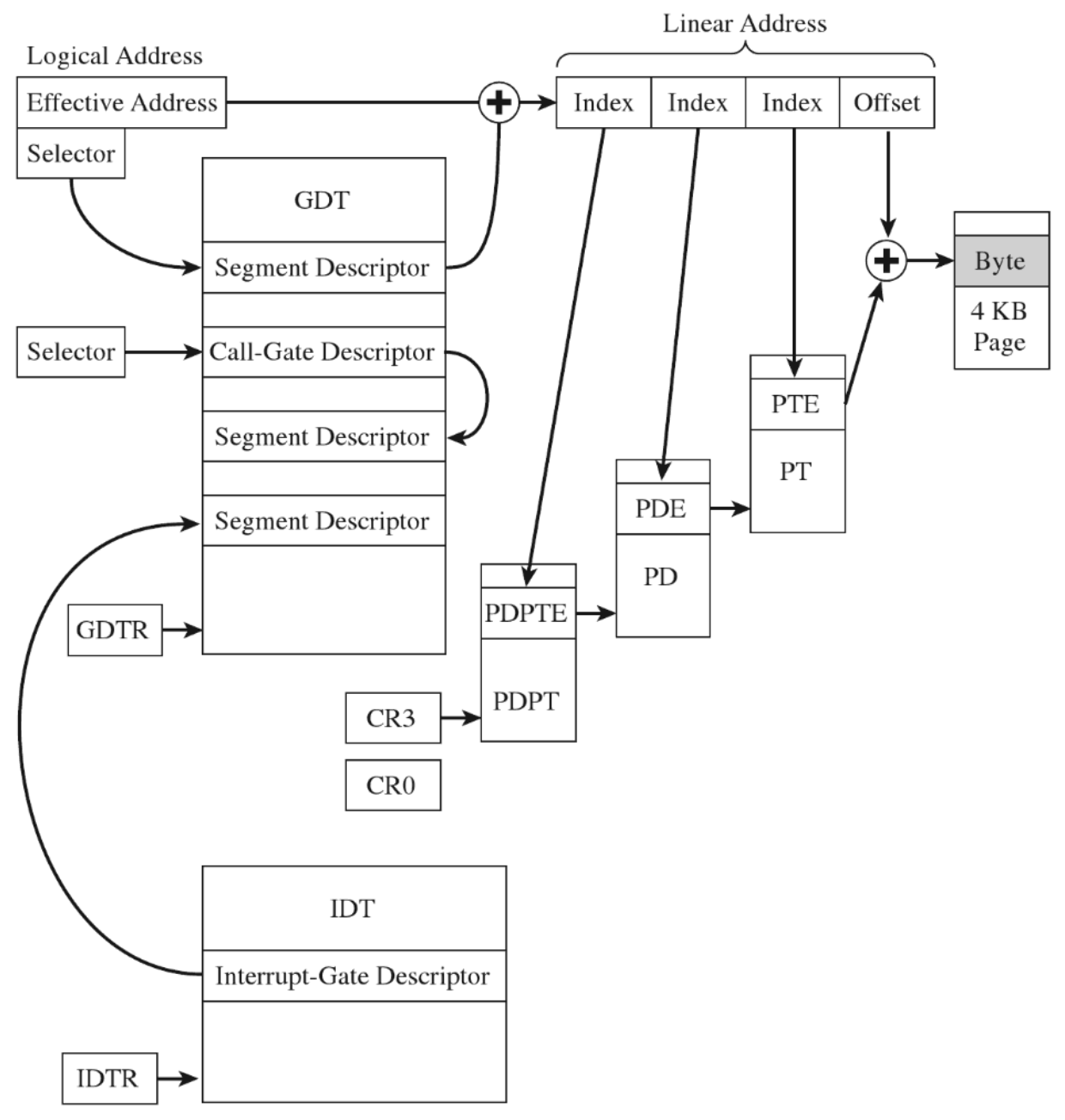
x64 - WinDbg playalong
Tested on Win10 1909 - Build 10.0.18363.592
Memory Consumption Overview
Total Memory Used
0: kd> !memusage 0x8

Max cache size is       : 107286528 bytes (0x19944 KB)
Total memory in cache   : 25200048 bytes (0x6022 KB)
Number of regions cached: 584
3371339 full reads broken into 3371360 partial reads
    counts: 3370769 cached/591 uncached, 99.98% cached
    bytes : 33744687 cached/25162680 uncached, 57.28% cached
** Transition PTEs are implicitly decoded
PAE (Physical Address Extension) is not supported on Windows10 PAE is supported only on the following 32-bit versions of Windows running on x86-based systems:
- Windows 7 (32 bit only)
- Windows Server 2008 (32-bit only)
- Windows Vista (32-bit only)
- Windows Server 2003 (32-bit only)
- Windows XP (32-bit only)
So it will not be covered as it’s not part of Windows10-64 (PAE still exits on 32-bit version win10 though)
Pages, Pages Frames and Page Frame Numbers
Page: a contiguous region in a linear address space (4KB, 2MB or 4MB) no physical location, as it can reside on memory or on disk.
Page Frame: Specific location in physical memory (RAM) where a page is stored and it is rappresented by a Page Frame Number (PFN)
Page Frame Number: unsigned integer that rappresent a phyisical address.
Segmentation
Windows employs the U/S bit in the PDE/PTE to tell the difference between Ring 0 and Rin3.
inspecting GDTR and GDTL
0: kd> rM 0x100
gdtr=fffff8077625dfb0   gdtl=0057 idtr=fffff8077625b000   idtl=0fff tr=0040  ldtr=0000
0: kd> r gdtr
gdtr=fffff8077625dfb0
0: kd> r gdtl
gdtl=0057
GDT starts at 0xfffff8077625dfb0 and is 0x57 (87 bytes) big, we can raw dumping it:
0: kd> d fffff8077625dfb0 L57
fffff807`7625dfb0  00 00 00 00 00 00 00 00-00 00 00 00 00 00 00 00  ................
fffff807`7625dfc0  00 00 00 00 00 9b 20 00-00 00 00 00 00 93 40 00  ...... .......@.
fffff807`7625dfd0  ff ff 00 00 00 fb cf 00-ff ff 00 00 00 f3 cf 00  ................
fffff807`7625dfe0  00 00 00 00 00 fb 20 00-00 00 00 00 00 00 00 00  ...... .........
fffff807`7625dff0  67 00 00 c0 25 8b 00 76-07 f8 ff ff 00 00 00 00  g...%..v........
fffff807`7625e000  00 3c 00 00 00 f3 40
Or prettify the output with the dg command:
0: kd> dg 0 57
                                                    P Si Gr Pr Lo
Sel        Base              Limit          Type    l ze an es ng Flags
---- ----------------- ----------------- ---------- - -- -- -- -- --------
0000 00000000`00000000 00000000`00000000 <Reserved> 0 Nb By Np Nl 00000000
0008 00000000`00000000 00000000`00000000 <Reserved> 0 Nb By Np Nl 00000000
0010 00000000`00000000 00000000`00000000 Code RE Ac 0 Nb By P  Lo 0000029b
0018 00000000`00000000 00000000`00000000 Data RW Ac 0 Bg By P  Nl 00000493
0020 00000000`00000000 00000000`ffffffff Code RE Ac 3 Bg Pg P  Nl 00000cfb
0028 00000000`00000000 00000000`ffffffff Data RW Ac 3 Bg Pg P  Nl 00000cf3
0030 00000000`00000000 00000000`00000000 Code RE Ac 3 Nb By P  Lo 000002fb
0038 00000000`00000000 00000000`00000000 <Reserved> 0 Nb By Np Nl 00000000
0040 00000000`7625c000 00000000`00000067 TSS32 Busy 0 Nb By P  Nl 0000008b
0048 00000000`0000ffff 00000000`0000f807 <Reserved> 0 Nb By Np Nl 00000000
0050 00000000`00000000 00000000`00003c00 Data RW Ac 3 Bg By P  Nl 000004f3
We can see that Ring3 Segment Descriptors are limited in space from 0x0 to 0x0’ffffffff
Virtual (linear) to physical address mapping
Get the EPROCESS address of the target process
3: kd> !process  0 0 easykatz.exe
PROCESS ffffb08789914080
    SessionId: 1  Cid: 27a0    Peb: 00404000  ParentCid: 247c
    DirBase: 23894f002  ObjectTable: ffffc18e38823b00  HandleCount: 181.
    Image: easykatz.exe
Attach to it
0: kd> .process /i /p /r ffffb08789914080
Implicit process is now ffffb08789914080
Reload user modules
0: kd> .reload /user
Loading User Symbols
.......................................................
Reload userland module and pick the first base address, which has the very noticible PE header.
3: kd> lmuD
start             end                 module name
00007ff7`ca530000 00007ff7`ca65f000   mimikatz   (deferred)
00007ffd`5fc70000 00007ffd`5fcba000   vaultcli   (deferred)

3: kd> db 00007ff7ca530000
00007ff7`ca530000  4d 5a 90 00 03 00 00 00-04 00 00 00 ff ff 00 00  MZ..............
00007ff7`ca530010  b8 00 00 00 00 00 00 00-40 00 00 00 00 00 00 00  ........@.......
00007ff7`ca530020  00 00 00 00 00 00 00 00-00 00 00 00 00 00 00 00  ................
00007ff7`ca530030  00 00 00 00 00 00 00 00-00 00 00 00 20 01 00 00  ............ ...
00007ff7`ca530040  0e 1f ba 0e 00 b4 09 cd-21 b8 01 4c cd 21 54 68  ........!..L.!Th
00007ff7`ca530050  69 73 20 70 72 6f 67 72-61 6d 20 63 61 6e 6e 6f  is program canno
00007ff7`ca530060  74 20 62 65 20 72 75 6e-20 69 6e 20 44 4f 53 20  t be run in DOS
00007ff7`ca530070  6d 6f 64 65 2e 0d 0d 0a-24 00 00 00 00 00 00 00  mode....$.......
And then we can verify the PTE translated physical address
3: kd> !pte 00007ff7`ca530000
                                           VA 00007ff7ca530000
PXE at FFFFFCFE7F3F97F8    PPE at FFFFFCFE7F2FFEF8    PDE at FFFFFCFE5FFDF290    PTE at FFFFFCBFFBE52980
contains 0A00000127E5E867  contains 0A00000223F5F867  contains 0A00000238B60867  contains 80000002362E5025
pfn 127e5e    ---DA--UWEV  pfn 223f5f    ---DA--UWEV  pfn 238b60    ---DA--UWEV  pfn 2362e5    ----A--UR-V
We can inspect the content of the physical address (the final ‘pfn’) by using the !db command (as opposed to the standard ‘db’ which is meant for virtual address only). The PTE contains 80000002362E5025, whose PFN maps the physical address is bits 12 to (M–1), so 2362E5025000 (trailing zeroes are omitted from the output.)
3: kd> !db 2362E5000
#2362e5000 4d 5a 90 00 03 00 00 00-04 00 00 00 ff ff 00 00 MZ..............
#2362e5010 b8 00 00 00 00 00 00 00-40 00 00 00 00 00 00 00 ........@.......
#2362e5020 00 00 00 00 00 00 00 00-00 00 00 00 00 00 00 00 ................
#2362e5030 00 00 00 00 00 00 00 00-00 00 00 00 20 01 00 00 ............ ...
#2362e5040 0e 1f ba 0e 00 b4 09 cd-21 b8 01 4c cd 21 54 68 ........!..L.!Th
#2362e5050 69 73 20 70 72 6f 67 72-61 6d 20 63 61 6e 6e 6f is program canno
#2362e5060 74 20 62 65 20 72 75 6e-20 69 6e 20 44 4f 53 20 t be run in DOS
#2362e5070 6d 6f 64 65 2e 0d 0d 0a-24 00 00 00 00 00 00 00 mode....$.......
As a proof we can see that the content of the virtual (linear) and phyisical address are identical.
Bonus - another way to get PFN from a VA and little extra information:
0: kd> !address -v -map 0xfffff8023d781600
===================================================================================================
PXE:    ffff974ba5d2ef80 [contains 0000000001108063]

        Page Frame Number:  1108, at address: ffffec8000033180
        Page Location:      6 (Active)
        Virtual address:    ffff974ba5df0000
        PTE Address:        ffff974ba5d2ef80
        Containing frame:   00000000000001ad
        Attributes:         M:Modified,Cached
        Usage:              PPEs; Process ffffd50de0e71080 [System], Entries:0

PPE:    ffff974ba5df0040 [contains 0000000001109063]

        Page Frame Number:  1109, at address: ffffec80000331b0
        Page Location:      6 (Active)
        Virtual address:    ffff974bbe008000
        PTE Address:        ffff974ba5df0040
        Containing frame:   0000000000001108
        Attributes:         M:Modified,Cached
        Usage:              PDEs; Process ffffd50de0e71080 [System], Entries:0

PDE:    ffff974bbe008f58 [contains 0a00000000875863]

        Page Frame Number:  875, at address: ffffec80000195f0
        Page Location:      6 (Active)
        Virtual address:    ffff977c011eb000
        PTE Address:        ffff974bbe008f58
        Containing frame:   0000000000001109
        Attributes:         M:Modified,Cached
        Usage:              PTEs; Process ffffd50de0e71080 [System], Entries:0

===================================================================================================
PTE:    ffff977c011ebc08 [contains 09000000031fd021]

        Page Frame Number:  31fd, at address: ffffec8000095f70
        Page Location:      6 (Active)
        PTE Address:        ffffbf0c38003d58
        Containing frame:   0000000000000e4b
        Attributes:         P:Prototype,Cached
        Usage:              MappedFile; CA:ffffd50de310f8a0 [\Windows\System32\drivers\klflt.sys]

Type:   Valid
Attrs:  Private,NormalPage,NotDirty,NotDirty1,Accessed,Kernel,NotWritable,NotWriteThrough,Cached
PFN:    31fd